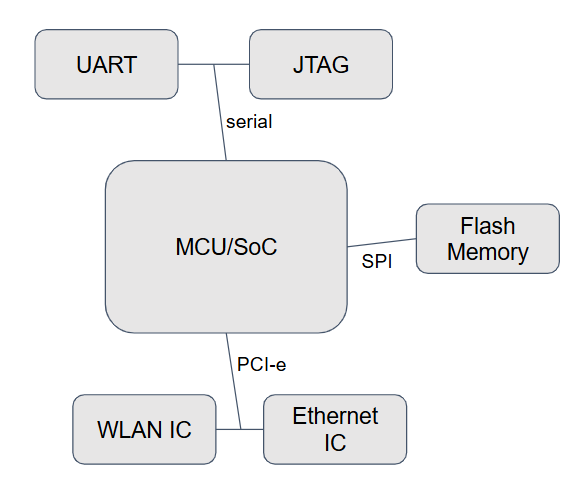
Locating debug interface
- UART
- Oscillator
- MCU/SoC
- JTAG
- Flash memory => Datasheet
UART (Universal Asynchronous Receiver-Transmitter)
- 두 장비 사이 비동기 직렬 통신 지원 (IoT <-> Computer, IoT <-> IoT)
- baud rates라고 하는 비동기 통신 속도 존재
(300, 600, 1200, 2400, 4800, 9600, 19200, 38400, 57600, 115200, 230400, 460800, 921600) - 대부분의 IoT 장비에 존재하며 보통 3개의 pin을 사용
- GND(Ground) : Signal 접지
- RX : reciver
- TX : trasmitter
- VCC : voltage
대부분의 Embedded/IoT 장비에서는 serical console이 존재하기 때문에 uart를 통해 접근하여 shell 획득이 가능하다.
Root shel 까지 접근 가능시
- Firmware/file-system 획득 가능
- Bootloader 접근 가능
- 동적 디버깅 가능
Serial console 접근이 힘든 케이스
- 제조사에서 serial console을 비활성화 해놓는 경우
- serial console의 로그인 계정 및 비밀번호가 필요한 경우 → Reversing
- sandbox가 존재하는 경우 → sandbox escape
- Anti UART 기능이 존재하는 경우 (physical) → 전기회로 조작
- Read only console인 경우→boot log, crash
UART
총 4개의 핀이 존재합니다.
- GND,VCC,RX, TX
구분 방법
GND : 접지 여부만 확인
VCC : 3.3V 여부 확인
RX : 전송부이기 때문에 아무런 작업안하면 0V가 나와야함
TX : 수신부는 데이터 전송때문에 가변 전압이 계속 나와야함
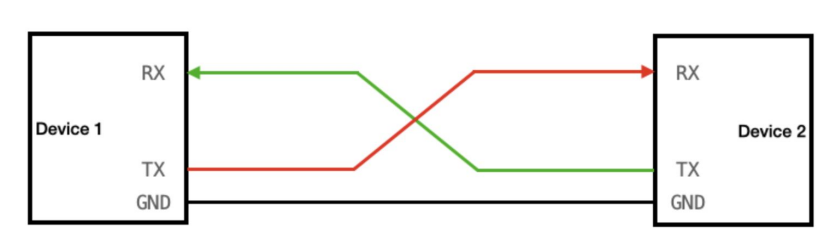
Connect to UART with UART converter and PC
- Device RX ←→ UART Converter TX
- Device TX ←→ UART Converter RX
- Device GND ←→ UART Converter GND
RX와 TX는 반대로 연결해야 수신부 통신부가 정상적으로 통신된다.
Serial console 접속
# tty명 확인
ls /dev/tty*
#tty 접근 방법
screen /dev/tty.usbserial -0001 115200
'Pwnable > Ananlysis' 카테고리의 다른 글
| Embedded & IoT device hacking (0) | 2025.11.14 |
|---|---|
| Docker (0) | 2025.11.13 |